Launch notes
Final details before we share the new site.
Tuesday
Keep the shot list here so it stays close to both tasks.
Add a checkbox while you write. That same task appears in Today and Upcoming, with the rest of the note still one tap away.
Native iPhone app, now in private testing
Final details before we share the new site.
Keep the shot list here so it stays close to both tasks.
Tuesday, 20 October
Morning
This task is open in the note and in Today.
The checkbox in the note and the task in Today are the same item. Finish one and the other updates too. The note stays attached for context.
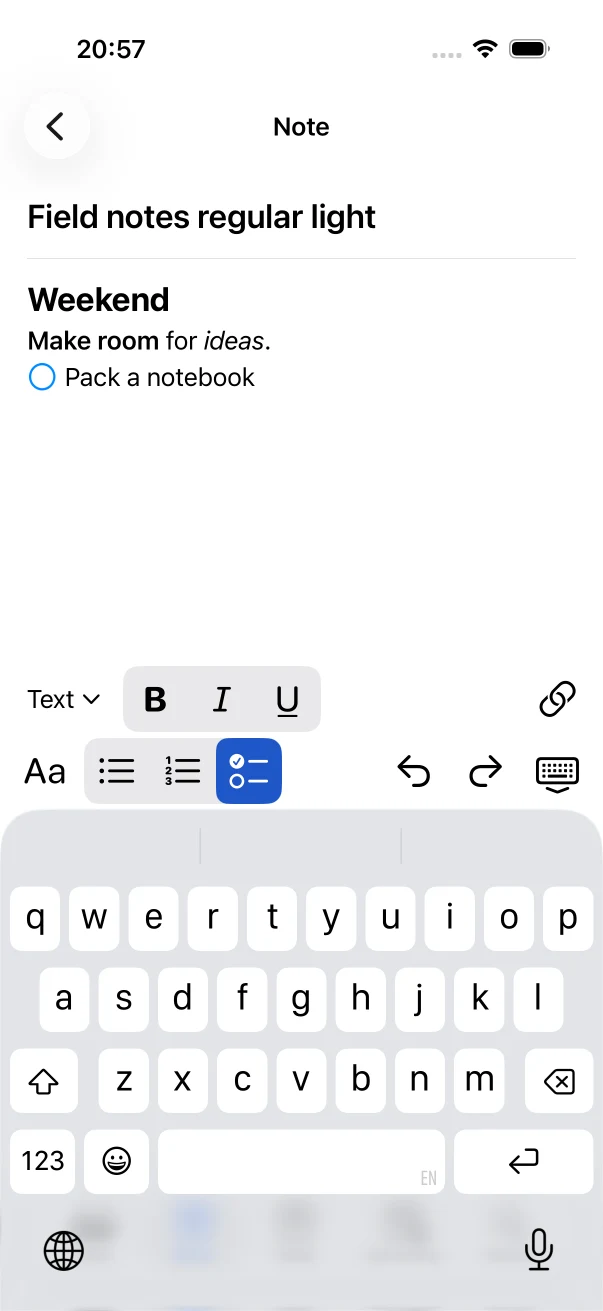
Native editor capture from a private iPhone build.
Use headings, lists, links, and formatting when you need them. Start a line with a Markdown checkbox and it becomes a task you can track outside the note.
Type "Review outline next Tuesday" in a checkbox line. NoteTasker pulls out the date and puts it on the task, while the title stays readable.
You can change the date or keep the words and leave the task unscheduled.
A link inside a checkbox task can keep a readable copy of the useful page text beside the task. You see more than a URL when you come back to it.
Battery life, trigger speed, weather sealing, and storage are the details most useful for this comparison.
Illustrative example. Public-link processing is explained in the app and can be stopped in Settings.
A single search finds note titles and text, open tasks, and completed tasks. Notes and tasks appear in separate groups so you can scan the results.
Notes
Tasks
They save on your iPhone and do not require an account. The current build does not sync your task library between devices.
What the current private build does, and what it does not.
Not yet. NoteTasker is in private testing. This site does not link to the App Store or a public TestFlight.
Yes. The checkbox line and the item in Tasks, Today, or Upcoming are the same task. Completing it in one place updates it everywhere else.
Yes. Notes and tasks save on your iPhone. Preparing a public link uses NoteTasker's service and external providers; the app explains that data use, and you can stop link processing in Settings.
No. The current build keeps its task library on one iPhone and does not sync it between devices.
There is no public download yet. You can still try the task demo above and read exactly what the current iPhone build does.
Try the demo again